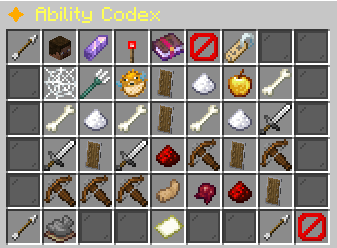
✦ Ability Codex
How to open
Type /pets abilities.
Cycle family, tier and trigger filters. Search by name, reset filters, browse pages and select an ability to open its details.
What each button does
✦ Ability Codex
These are captured in-game menus. Your items, progress and timers can change.
In-game menu pictures
Click to change.Example state · bracketed values depend on your game.Tier: ALLFilter by rarity tier.Selected: ALL
Click to change.Example state · bracketed values depend on your game.Trigger: ALLFilter by trigger type.Selected: ALL
Click to change.Example state · bracketed values depend on your game.✦ Ability CodexBrowse the loaded custom ability pool.Visible results: [in-game value]Loaded abilities: [in-game value]Activate a pet to use its abilities.Each rarity has one ability slot.Example state · bracketed values depend on your game.Reset FiltersClears family, tier, trigger, and search.
Click to reset.SearchCurrent: noneType part of an ability name.Type cancel to clear search.
Click to search.Example state · bracketed values depend on your game.Barnacle [UNCOMMON]Abyssal Family
Effect: Slow the enemy for 2s.
Trigger: Hit an enemy.Gain: Adds 3 Pressure on success.Chance: 10% per eligible trigger.Cooldown: None.
Click to view eligible pets.Brine Strike [UNCOMMON]Abyssal Family
Effect: Deal 2 damage and add 2 damageto the hit.
Trigger: Hit an enemy.Gain: Adds 3 Pressure on success.Requires: Be in water.Chance: 20% per eligible trigger.Cooldown: None.
Click to view eligible pets.Deep Breath [UNCOMMON]Abyssal Family
Effect: Gain Water Breathing and 10oxygen bonus for 4s.
Trigger: Automatic while this pet isactive.Chance: 100% per eligible trigger.Cooldown: None.
Click to view eligible pets.Pressure Skin [UNCOMMON]Abyssal Family
Effect: Reduce the incoming hit by 2damage.
Trigger: Triggers when you takedamage.Gain: Adds 5 Pressure on success.Requires: Be in water.Chance: 20% per eligible trigger.Cooldown: None.
Click to view eligible pets.Swift Current [UNCOMMON]Abyssal Family
Effect: Gain movement speed for 4s.
Trigger: Start sprinting.Gain: Adds 3 Pressure on success.Chance: 100% per eligible trigger.Cooldown: 4s after a successfultrigger.
Click to view eligible pets.Tidepool [UNCOMMON]Abyssal Family
Effect: Heal 2 HP after a kill.
Trigger: Kill an enemy.Gain: Adds 8 Pressure on success.Requires: Be in water.Chance: 20% per eligible trigger.Cooldown: None.
Click to view eligible pets.Beast Sense [UNCOMMON]Beastbond Family
Effect: Heal owned tamed animalswithin 5 blocks for 2 HP.
Trigger: Kill an enemy.Gain: Adds 4 Pack Bond on success.Chance: 20% per eligible trigger.Cooldown: None.
Click to view eligible pets.Bonded [UNCOMMON]Beastbond Family
Effect: Order one of your tamedanimals within 5 blocks to target theenemy you hit.
Trigger: Hit an enemy.Gain: Adds 2 Pack Bond on success.Chance: 10% per eligible trigger.Cooldown: None.
Click to view eligible pets.Feral Speed [UNCOMMON]Beastbond Family
Effect: Gain movement speed for 4s.
Trigger: Start sprinting.Gain: Adds 2 Pack Bond on success.Chance: 100% per eligible trigger.Cooldown: 4s after a successfultrigger.
Click to view eligible pets.Kinship [UNCOMMON]Beastbond Family
Effect: Your owned tamed animals gain1 damage.
Trigger: Automatic while this pet isactive.Chance: 100% per eligible trigger.Cooldown: None.
Click to view eligible pets.Loyal Guard [UNCOMMON]Beastbond Family
Effect: Reduce incoming damage by 2.
Trigger: Triggers when you takedamage.Gain: Adds 3 Pack Bond on success.Chance: 20% per eligible trigger.Cooldown: None.
Click to view eligible pets.Pack Instinct [UNCOMMON]Beastbond Family
Effect: Deal 1 damage and add 1 damageto the hit.
Trigger: Hit an enemy.Gain: Adds 2 Pack Bond on success.Chance: 20% per eligible trigger.Cooldown: None.
Click to view eligible pets.Bladedancer [UNCOMMON]Bladewraith Family
Effect: Gain movement speed for 4s.
Trigger: Start sprinting.Gain: Adds 1 Edge on success.Chance: 100% per eligible trigger.Cooldown: 4s after a successfultrigger.
Click to view eligible pets.Keen Edge [UNCOMMON]Bladewraith Family
Effect: Add 1 damage per current Edgestack.
Trigger: Hit an enemy.Gain: Adds 1 Edge on success.Chance: 20% per eligible trigger.Cooldown: None.
Click to view eligible pets.Nick [UNCOMMON]Bladewraith Family
Effect: Make the enemy bleed for 2s.
Trigger: Hit an enemy.Gain: Adds 1 Edge on success.Chance: 10% per eligible trigger.Cooldown: None.
Click to view eligible pets.Parry [UNCOMMON]Bladewraith Family
Effect: Reduce the incoming hit by 3damage.
Trigger: Triggers when you takedamage.Gain: Adds 1 Edge on success.Chance: 12% per eligible trigger.Cooldown: None.
Click to view eligible pets.Swift Draw [UNCOMMON]Bladewraith Family
Effect: Gain attack speed for 4s.
Trigger: Automatic while this pet isactive.Requires: Hold a sword in your mainhand.Chance: 100% per eligible trigger.Cooldown: None.
Click to view eligible pets.Whetstone [UNCOMMON]Bladewraith Family
Effect: Gain 2 Edge on a successfultrigger.
Trigger: Kill an enemy.Gain: Adds 2 Edge on success.Chance: 20% per eligible trigger.Cooldown: None.
Click to view eligible pets.Bolt Sense [UNCOMMON]Boltwarden Family
Effect: Add 1 damage to crossbowshots.
Trigger: Automatic while this pet isactive.Chance: 100% per eligible trigger.Cooldown: None.
Click to view eligible pets.Braced [UNCOMMON]Boltwarden Family
Effect: Reduce the incoming hit by 2damage.
Trigger: Triggers when you takedamage.Gain: Adds 1 Load on success.Requires: Hold a crossbow in your mainhand.Chance: 20% per eligible trigger.Cooldown: None.
Click to view eligible pets.Punchthrough [UNCOMMON]Boltwarden Family
Effect: Add 3 damage to the bolt.
Trigger: Fire a loaded crossbow.Gain: Adds 1 Load on success.Chance: 10% per eligible trigger.Cooldown: None.
Click to view eligible pets.Quick Load [UNCOMMON]Boltwarden Family
Effect: Prepare a 10% shorter crossbowreload.
Trigger: Fire a loaded crossbow.Gain: Adds 1 Load on success.Chance: 20% per eligible trigger.Cooldown: None.
Click to view eligible pets.Steady Frame [UNCOMMON]Boltwarden Family
Effect: Gain movement speed for 2swhile holding a crossbow.
Trigger: Start sprinting.Requires: Hold a crossbow in your mainhand.Chance: 100% per eligible trigger.Cooldown: 4s after a successfultrigger.
Click to view eligible pets.Sure Shot [UNCOMMON]Boltwarden Family
Effect: Prepare a chance to save boltsfor 6s.
Trigger: Fire a loaded crossbow.Gain: Adds 1 Load on success.Chance: 10% per eligible trigger.Cooldown: None.
Click to view eligible pets.Alchemist's Eye [UNCOMMON]Brewmancer Family
Effect: Gain 1 Luck for 4s.
Trigger: Automatic while this pet isactive.Chance: 100% per eligible trigger.Cooldown: None.
Click to view eligible pets.Bitter Draught [UNCOMMON]Brewmancer Family
Effect: Weaken the enemy's attackdamage for 3s.
Trigger: Hit an enemy.Gain: Adds 5 Potency on success.Chance: 10% per eligible trigger.Cooldown: None.
Click to view eligible pets.Catalyst [UNCOMMON]Brewmancer Family
Effect: Gain 8 Potency on a successfultrigger.
Trigger: Kill an enemy.Gain: Adds 8 Potency on success.Chance: 20% per eligible trigger.Cooldown: None.
Click to view eligible pets.Elixir Skin [UNCOMMON]Brewmancer Family
Effect: Reduce the incoming hit by 2damage.
Trigger: Triggers when you takedamage.Gain: Adds 6 Potency on success.Chance: 20% per eligible trigger.Cooldown: None.
Click to view eligible pets.BackReturn to the Pet Hub.◀ PreviousPage 1/[pages]No previous page.Example state · bracketed values depend on your game.Page 1 / [pages]Showing [in-game value] ability result(s).Family: ALLTier: ALLTrigger: ALLExample state · bracketed values depend on your game.Next ▶Page 1/[pages]No next page.Example state · bracketed values depend on your game.CloseClose this menu.
Explore the button explanations
Menu picture
Illustrated control map. Item availability, labels and locked states can change in-game. Symbols identify actions; they are not exact item textures.
Choose a pictured button to read what it does. Use arrow keys to move between buttons. On a phone, scroll the picture sideways.
✦ Ability Codex
Top row: Back: Return to the previous menu. Family: Choose which family’s abilities to browse. Tier: Choose an ability rarity. Trigger: Choose an ability action to browse. ✦ Ability Codex: Read Ability Codex. Reset Filters: Show abilities across all filters again. Search: Find an ability by name. Menu information: Read Menu information.
Middle: Ability name: Read this ability’s effect and requirements. No abilities match these filters.: Read No abilities match these filters.
Bottom row: Back: Return to the previous menu. ◀ Previous: Show the previous page. Page: Read the current page. Next ▶: Show the next page. Close: Close this menu.
Pictures
Click to change.Example state · bracketed values depend on your game.Tier: ALLFilter by rarity tier.Selected: ALL
Click to change.Example state · bracketed values depend on your game.Trigger: ALLFilter by trigger type.Selected: ALL
Click to change.Example state · bracketed values depend on your game.✦ Ability CodexBrowse the loaded custom ability pool.Visible results: [in-game value]Loaded abilities: [in-game value]Activate a pet to use its abilities.Each rarity has one ability slot.Example state · bracketed values depend on your game.Reset FiltersClears family, tier, trigger, and search.
Click to reset.SearchCurrent: noneType part of an ability name.Type cancel to clear search.
Click to search.Example state · bracketed values depend on your game.Barnacle [UNCOMMON]Abyssal Family
Effect: Slow the enemy for 2s.
Trigger: Hit an enemy.Gain: Adds 3 Pressure on success.Chance: 10% per eligible trigger.Cooldown: None.
Click to view eligible pets.Brine Strike [UNCOMMON]Abyssal Family
Effect: Deal 2 damage and add 2 damageto the hit.
Trigger: Hit an enemy.Gain: Adds 3 Pressure on success.Requires: Be in water.Chance: 20% per eligible trigger.Cooldown: None.
Click to view eligible pets.Deep Breath [UNCOMMON]Abyssal Family
Effect: Gain Water Breathing and 10oxygen bonus for 4s.
Trigger: Automatic while this pet isactive.Chance: 100% per eligible trigger.Cooldown: None.
Click to view eligible pets.Pressure Skin [UNCOMMON]Abyssal Family
Effect: Reduce the incoming hit by 2damage.
Trigger: Triggers when you takedamage.Gain: Adds 5 Pressure on success.Requires: Be in water.Chance: 20% per eligible trigger.Cooldown: None.
Click to view eligible pets.Swift Current [UNCOMMON]Abyssal Family
Effect: Gain movement speed for 4s.
Trigger: Start sprinting.Gain: Adds 3 Pressure on success.Chance: 100% per eligible trigger.Cooldown: 4s after a successfultrigger.
Click to view eligible pets.Tidepool [UNCOMMON]Abyssal Family
Effect: Heal 2 HP after a kill.
Trigger: Kill an enemy.Gain: Adds 8 Pressure on success.Requires: Be in water.Chance: 20% per eligible trigger.Cooldown: None.
Click to view eligible pets.Beast Sense [UNCOMMON]Beastbond Family
Effect: Heal owned tamed animalswithin 5 blocks for 2 HP.
Trigger: Kill an enemy.Gain: Adds 4 Pack Bond on success.Chance: 20% per eligible trigger.Cooldown: None.
Click to view eligible pets.Bonded [UNCOMMON]Beastbond Family
Effect: Order one of your tamedanimals within 5 blocks to target theenemy you hit.
Trigger: Hit an enemy.Gain: Adds 2 Pack Bond on success.Chance: 10% per eligible trigger.Cooldown: None.
Click to view eligible pets.Feral Speed [UNCOMMON]Beastbond Family
Effect: Gain movement speed for 4s.
Trigger: Start sprinting.Gain: Adds 2 Pack Bond on success.Chance: 100% per eligible trigger.Cooldown: 4s after a successfultrigger.
Click to view eligible pets.Kinship [UNCOMMON]Beastbond Family
Effect: Your owned tamed animals gain1 damage.
Trigger: Automatic while this pet isactive.Chance: 100% per eligible trigger.Cooldown: None.
Click to view eligible pets.Loyal Guard [UNCOMMON]Beastbond Family
Effect: Reduce incoming damage by 2.
Trigger: Triggers when you takedamage.Gain: Adds 3 Pack Bond on success.Chance: 20% per eligible trigger.Cooldown: None.
Click to view eligible pets.Pack Instinct [UNCOMMON]Beastbond Family
Effect: Deal 1 damage and add 1 damageto the hit.
Trigger: Hit an enemy.Gain: Adds 2 Pack Bond on success.Chance: 20% per eligible trigger.Cooldown: None.
Click to view eligible pets.Bladedancer [UNCOMMON]Bladewraith Family
Effect: Gain movement speed for 4s.
Trigger: Start sprinting.Gain: Adds 1 Edge on success.Chance: 100% per eligible trigger.Cooldown: 4s after a successfultrigger.
Click to view eligible pets.Keen Edge [UNCOMMON]Bladewraith Family
Effect: Add 1 damage per current Edgestack.
Trigger: Hit an enemy.Gain: Adds 1 Edge on success.Chance: 20% per eligible trigger.Cooldown: None.
Click to view eligible pets.Nick [UNCOMMON]Bladewraith Family
Effect: Make the enemy bleed for 2s.
Trigger: Hit an enemy.Gain: Adds 1 Edge on success.Chance: 10% per eligible trigger.Cooldown: None.
Click to view eligible pets.Parry [UNCOMMON]Bladewraith Family
Effect: Reduce the incoming hit by 3damage.
Trigger: Triggers when you takedamage.Gain: Adds 1 Edge on success.Chance: 12% per eligible trigger.Cooldown: None.
Click to view eligible pets.Swift Draw [UNCOMMON]Bladewraith Family
Effect: Gain attack speed for 4s.
Trigger: Automatic while this pet isactive.Requires: Hold a sword in your mainhand.Chance: 100% per eligible trigger.Cooldown: None.
Click to view eligible pets.Whetstone [UNCOMMON]Bladewraith Family
Effect: Gain 2 Edge on a successfultrigger.
Trigger: Kill an enemy.Gain: Adds 2 Edge on success.Chance: 20% per eligible trigger.Cooldown: None.
Click to view eligible pets.Bolt Sense [UNCOMMON]Boltwarden Family
Effect: Add 1 damage to crossbowshots.
Trigger: Automatic while this pet isactive.Chance: 100% per eligible trigger.Cooldown: None.
Click to view eligible pets.Braced [UNCOMMON]Boltwarden Family
Effect: Reduce the incoming hit by 2damage.
Trigger: Triggers when you takedamage.Gain: Adds 1 Load on success.Requires: Hold a crossbow in your mainhand.Chance: 20% per eligible trigger.Cooldown: None.
Click to view eligible pets.Punchthrough [UNCOMMON]Boltwarden Family
Effect: Add 3 damage to the bolt.
Trigger: Fire a loaded crossbow.Gain: Adds 1 Load on success.Chance: 10% per eligible trigger.Cooldown: None.
Click to view eligible pets.Quick Load [UNCOMMON]Boltwarden Family
Effect: Prepare a 10% shorter crossbowreload.
Trigger: Fire a loaded crossbow.Gain: Adds 1 Load on success.Chance: 20% per eligible trigger.Cooldown: None.
Click to view eligible pets.Steady Frame [UNCOMMON]Boltwarden Family
Effect: Gain movement speed for 2swhile holding a crossbow.
Trigger: Start sprinting.Requires: Hold a crossbow in your mainhand.Chance: 100% per eligible trigger.Cooldown: 4s after a successfultrigger.
Click to view eligible pets.Sure Shot [UNCOMMON]Boltwarden Family
Effect: Prepare a chance to save boltsfor 6s.
Trigger: Fire a loaded crossbow.Gain: Adds 1 Load on success.Chance: 10% per eligible trigger.Cooldown: None.
Click to view eligible pets.Alchemist's Eye [UNCOMMON]Brewmancer Family
Effect: Gain 1 Luck for 4s.
Trigger: Automatic while this pet isactive.Chance: 100% per eligible trigger.Cooldown: None.
Click to view eligible pets.Bitter Draught [UNCOMMON]Brewmancer Family
Effect: Weaken the enemy's attackdamage for 3s.
Trigger: Hit an enemy.Gain: Adds 5 Potency on success.Chance: 10% per eligible trigger.Cooldown: None.
Click to view eligible pets.Catalyst [UNCOMMON]Brewmancer Family
Effect: Gain 8 Potency on a successfultrigger.
Trigger: Kill an enemy.Gain: Adds 8 Potency on success.Chance: 20% per eligible trigger.Cooldown: None.
Click to view eligible pets.Elixir Skin [UNCOMMON]Brewmancer Family
Effect: Reduce the incoming hit by 2damage.
Trigger: Triggers when you takedamage.Gain: Adds 6 Potency on success.Chance: 20% per eligible trigger.Cooldown: None.
Click to view eligible pets.BackReturn to the Pet Hub.◀ PreviousPage 1/[pages]No previous page.Example state · bracketed values depend on your game.Page 1 / [pages]Showing [in-game value] ability result(s).Family: ALLTier: ALLTrigger: ALLExample state · bracketed values depend on your game.Next ▶Page 1/[pages]No next page.Example state · bracketed values depend on your game.CloseClose this menu.