EXP Share
What it is
Choose idle pets in EXP Share to train them alongside your active companion. Each selected pet receives its own share.
Each recipient receives the share percentage of the active conversion before each pet’s bonuses. The percentage applies independently to every selected recipient. It is not a single pool divided between pets, and the active companion does not surrender that amount of its XP. Different recipient bonuses can still produce different final gains.
Quick facts
- No rank: 0 pets
- Rank 1: 1 pet
- Rank 2: 2 pets
- Rank 3: 3 pets
- Rank 4: 4 pets
- Rank 5: 5 pets
- Rank 6: 6 pets
- Rank 7: 7 pets
In-game pictures
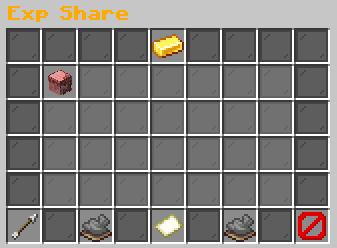
Click an idle pet to toggle.Example state · bracketed values depend on your game.[Pet name and gender]Rarity: [Rarity]Level: [level]Gender: [Gender] | Gen [generation]Breeds: [breeds]/3
Selected for Exp ShareClick to remove.Example state · bracketed values depend on your game.BackReturn to the previous menu.Previous PageNo previous page.Example state · bracketed values depend on your game.Page 1 / [pages]Idle pets: [in-game value]Active pets cannot be selected.Example state · bracketed values depend on your game.Next PageNo next page.Example state · bracketed values depend on your game.CloseClose this menu.
Pictures show a captured example. Your pets, rewards and timers can change.
How to start
Open Pet Hub > EXP Share or type /pets expshare. Click an idle pet to select it. Click it again to remove it.
Read the capacity in the header. Your highest eligible rank sets that capacity. Ranks do not add together.
Steps
- Activate the pet you want to use for normal gameplay.
- Open EXP Share and read the unlocked-capacity count in its header.
- Click an idle pet to select it. Look for its selected indicator and the selection feedback.
- Select additional pets up to the capacity shown. If all slots are in use, remove an existing recipient before adding another.
- Return to normal play and earn eligible skill XP with your active companion.
- Reopen EXP Share after changing your active pet or rank, and check which idle pets remain selected.
Reference
| Rank or rule | Pets or percentage |
|---|---|
| No rank | 0 pets |
| Rank 1 | 1 pet |
| Rank 2 | 2 pets |
| Rank 3 | 3 pets |
| Rank 4 | 4 pets |
| Rank 5 | 5 pets |
| Rank 6 | 6 pets |
| Rank 7 | 7 pets |
| Rank 8 | 8 pets |
| Share per idle pet | 25% |
| Matching family skill | 100% |
| Other skills | 50% |
What can go wrong
Selection is rejected when all slots are in use. The active pet is also ineligible. If you activate a selected idle companion, activation removes it from EXP Share automatically. Choose a replacement if you want to keep the remaining capacity occupied.
Shared XP depends on normal active-companion conversion. If you are inactive, the event carries no positive XP, or there is no usable active pet, there is no converted amount to share. Selecting a recipient is not an independent training timer. A selected max-level pet cannot exceed the level ceiling.
Worked example
Activate Pebble Whelp and select Tidepool Fry for EXP Share. Eligible Mining XP first uses 100% pet XP conversion. Tidepool Fry then receives 25% of that amount before its own bonuses.
Tidepool Fry remains idle. Its habitat and attached item can change its final XP gain. Pebble Whelp keeps its full active training award.
More to know
Capacity follows rank grants rather than the number of owned pets or the active companion's rarity. A higher-rarity active pet does not unlock additional share slots. The header is a current selection count, not a promise that every idle pet on every page trains.
Selections retain an order. When capacity is lower than the selected pets, only entries within usable capacity receive shared progression. Check the menu after a rank change. Old selections do not create permanent extra capacity. Remove recipients and choose the pets you want to occupy the available slots.
Recipient XP bonuses apply after the shared amount is calculated. The active pet's final displayed gain is consequently not always a reliable number to multiply directly by the share percentage. Compare the same event and account for each pet's affinity and equipment before concluding that training failed. Shared training also does not copy the active pet's current level or rarity into a recipient.
Your questions
Is the percentage split between recipients?
No. Each usable selected idle recipient receives the full share percentage.
Does EXP Share reduce active pet XP?
No. It awards additional idle-recipient progression from the conversion amount.
Why did a selection disappear when summoned?
Activation removes that pet because the active companion cannot be an idle recipient.
Do rank grants stack?
No. The highest qualifying rank supplies the available capacity.
Why is capacity empty?
Your account is using its base rank capacity. Check the player rank reference and menu header.
Why did selected pets gain different levels?
Their final bonuses and rarity-scaled level requirements differ.