Exp Share
How to open
Type /pets expshare.
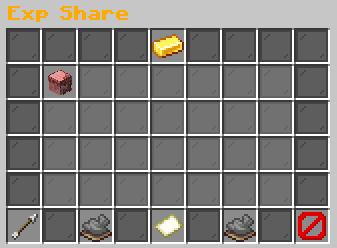
Click an idle pet to add or remove it from EXP Share. Previous and Next turn pages. Back returns to Your Pets.
What each button does
Exp Share
These are captured in-game menus. Your items, progress and timers can change.
In-game menu pictures
Click an idle pet to toggle.Example state · bracketed values depend on your game.[Pet name and gender]Rarity: [Rarity]Level: [level]Gender: [Gender] | Gen [generation]Breeds: [breeds]/3
Selected for Exp ShareClick to remove.Example state · bracketed values depend on your game.BackReturn to the previous menu.Previous PageNo previous page.Example state · bracketed values depend on your game.Page 1 / [pages]Idle pets: [in-game value]Active pets cannot be selected.Example state · bracketed values depend on your game.Next PageNo next page.Example state · bracketed values depend on your game.CloseClose this menu.
Explore the button explanations
Menu picture
Illustrated control map. Item availability, labels and locked states can change in-game. Symbols identify actions; they are not exact item textures.
Choose a pictured button to read what it does. Use arrow keys to move between buttons. On a phone, scroll the picture sideways.
Exp Share
Top row: Exp Share: Read Exp Share.
Middle: Idle pet: Add this pet to EXP Share, or remove it if already selected.
Bottom row: Back: Return to the previous menu. Previous Page: Show the previous page. Page: Read the current page. Next Page: Show the next page. Close: Close this menu.
Pictures
Click an idle pet to toggle.Example state · bracketed values depend on your game.[Pet name and gender]Rarity: [Rarity]Level: [level]Gender: [Gender] | Gen [generation]Breeds: [breeds]/3
Selected for Exp ShareClick to remove.Example state · bracketed values depend on your game.BackReturn to the previous menu.Previous PageNo previous page.Example state · bracketed values depend on your game.Page 1 / [pages]Idle pets: [in-game value]Active pets cannot be selected.Example state · bracketed values depend on your game.Next PageNo next page.Example state · bracketed values depend on your game.CloseClose this menu.