Open this menu from the feature guide linked below.
Read discovered and hidden pet species. Use Previous Page and Next Page to browse the catalog.
What each button does
✦ Pet Codex
These are captured in-game menus. Your items, progress and timers can change.
In-game menu pictures
Codex ProgressCodex ProgressCompletion: [completion]%Completion: [completion]%Discovered: [discovered pets] / [total pets]Discovered: [discovered pets] / [total pets]Example state · bracketed values depend on your game.[Pet name][Pet name]Rarity: [RARITY]Rarity: [RARITY]Family: [Family]Family: [Family]Family Type: [Family type]Family Type: [Family type]Primary Skill: [in-game value]Primary Skill: [in-game value]Lore: [in-game value]Lore: [in-game value]Example state · bracketed values depend on your game.BackBackReturn to the previous menu.Return to the previous menu.Previous PagePrevious PagePage 1 / [pages]Page 1 / [pages]Example state · bracketed values depend on your game.Next PageNext PagePage 1 / [pages]Page 1 / [pages]Example state · bracketed values depend on your game.CloseCloseClose this menu.Close this menu.
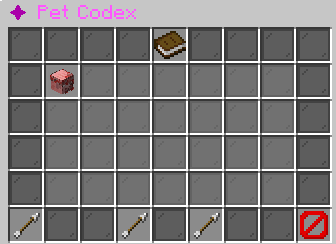
Pet Codex: discovered species and navigation controlsHover an item, focus it with the keyboard, or tap for its in-game tooltip. Bracketed values vary with your game.
Explore the button explanations
Menu picture
Illustrated control map. Item availability, labels and locked states can change in-game. Symbols identify actions; they are not exact item textures.
Choose a pictured button to read what it does. Use arrow keys to move between buttons. On a phone, scroll the picture sideways.
✦ Pet Codex
Codex Progress — Read Codex Progress.
All button descriptions (7)
Codex Progress: Read Codex Progress.
Pet discovery: Read whether you have discovered this species.
Loading Pet Codex: Read Loading Pet Codex. Other states: Pet discovery. No Pets Loaded.
Back: Return to the previous menu.
Previous Page: Show the previous page.
Next Page: Show the next page.
Close: Close this menu.
Top row: Codex Progress: Read Codex Progress.
Middle: Pet discovery: Read whether you have discovered this species. Loading Pet Codex: Read Loading Pet Codex.
Bottom row: Back: Return to the previous menu. Previous Page: Show the previous page. Next Page: Show the next page. Close: Close this menu.
Codex ProgressCodex ProgressCompletion: [completion]%Completion: [completion]%Discovered: [discovered pets] / [total pets]Discovered: [discovered pets] / [total pets]Example state · bracketed values depend on your game.[Pet name][Pet name]Rarity: [RARITY]Rarity: [RARITY]Family: [Family]Family: [Family]Family Type: [Family type]Family Type: [Family type]Primary Skill: [in-game value]Primary Skill: [in-game value]Lore: [in-game value]Lore: [in-game value]Example state · bracketed values depend on your game.BackBackReturn to the previous menu.Return to the previous menu.Previous PagePrevious PagePage 1 / [pages]Page 1 / [pages]Example state · bracketed values depend on your game.Next PageNext PagePage 1 / [pages]Page 1 / [pages]Example state · bracketed values depend on your game.CloseCloseClose this menu.Close this menu.
Pet Codex: discovered species and navigation controlsHover an item, focus it with the keyboard, or tap for its in-game tooltip. Bracketed values vary with your game.