✦ Incubator✦ IncubatorRegistered Pet NurseryRegistered Pet NurseryCapacity: 1 slot per stacked blockCapacity: 1 slot per stacked blockMaximum stack: 3Maximum stack: 3Place inside your claim.Place inside your claim.Breaking preserves this incubator's identity.Breaking preserves this incubator's identity.
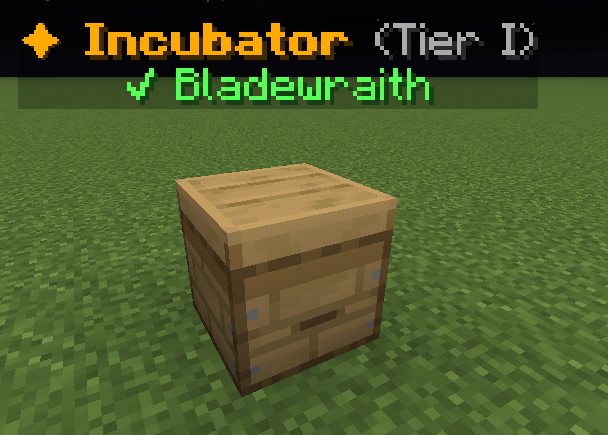
A placed special Incubator with a matching-family labelHover an item, focus it with the keyboard, or tap for its in-game tooltip. Bracketed values vary with your game.
✦ Incubator✦ IncubatorRegistered Pet NurseryRegistered Pet NurseryCapacity: 1 slot per stacked blockCapacity: 1 slot per stacked blockMaximum stack: 3Maximum stack: 3Place inside your claim.Place inside your claim.Breaking preserves this incubator's identity.Breaking preserves this incubator's identity.
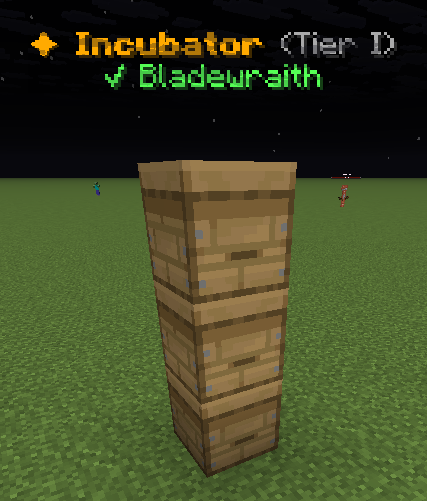
Three special Incubator blocks stacked verticallyHover an item, focus it with the keyboard, or tap for its in-game tooltip. Bracketed values vary with your game.
One block, one nursery position
Use the registered Incubator item. An ordinary beehive is not a pet nursery. Stack up to three special Incubator blocks for three positions.
Right-click your placed block to insert eggs, feed babies and collect adults. Your Incubators is a status directory; visit the block to use it.
1. Insert a family egg
Choose an empty upper position, then choose a carried egg. Use a suitable family biome.
[Lvl level] Pebble Whelp [gender][Lvl level] Pebble Whelp [gender][Pet type][Pet type]Family: [Family]Family: [Family]Family Type: [Family type]Family Type: [Family type]Gender: [Gender] | Gen [generation]Gender: [Gender] | Gen [generation]Breeds: [breeds]/3Breeds: [breeds]/3 [in-game value] XP: +[in-game value]%[in-game value] XP: +[in-game value]% ??? [UNCOMMON]??? [UNCOMMON]Unlocks at UncommonUnlocks at Uncommon ??? [RARE]??? [RARE]Unlocks at RareUnlocks at Rare ??? [EPIC]??? [EPIC]Unlocks at EpicUnlocks at Epic ??? [LEGENDARY]??? [LEGENDARY]Unlocks at LegendaryUnlocks at Legendary ??? [MYTHIC]??? [MYTHIC]Unlocks at MythicUnlocks at Mythic Progress to Level [next level]: [progress]%Progress to Level [next level]: [progress]%[XP progress bar] [XP]/[XP required][XP progress bar] [XP]/[XP required] Example state · bracketed values depend on your game.
2. Grow the baby
Read the timer below its position. Feed matching family food to the selected baby.
Pebble Whelp shown as an example.
3. Claim, then collect
When the pet is adult, select its position and use Claim. Collect it from Pet Delivery.
Visit your placed Incubator and right-click the block. /pets incubators shows where your incubators are.
Select an egg slot. Empty slots let you choose an inventory egg. Feed applies family food to the selected baby. Collect the adult through the completion button.
What each button does
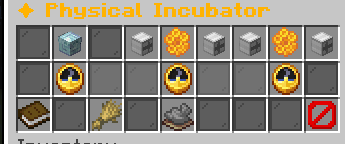
✦ Physical Incubator
These are captured in-game menus. Your items, progress and timers can change.
In-game menu pictures
Click the HoneycombClick the HoneycombChoose an egg for slot 1.Choose an egg for slot 1.Click the honeycomb between these arrows.Click the honeycomb between these arrows.Insert Egg · Slot 1Insert Egg · Slot 1▶ Selected▶ SelectedClick to choose a pet egg.Click to choose a pet egg.Keep eggs in your inventory.Keep eggs in your inventory.Click the HoneycombClick the HoneycombChoose an egg for slot 1.Choose an egg for slot 1.Click the honeycomb between these arrows.Click the honeycomb between these arrows.Click the HoneycombClick the HoneycombChoose an egg for slot 2.Choose an egg for slot 2.Click the honeycomb between these arrows.Click the honeycomb between these arrows.Insert Egg · Slot 2Insert Egg · Slot 2Click to selectClick to selectClick to choose a pet egg.Click to choose a pet egg.Keep eggs in your inventory.Keep eggs in your inventory.Click the HoneycombClick the HoneycombChoose an egg for slot 2.Choose an egg for slot 2.Click the honeycomb between these arrows.Click the honeycomb between these arrows.Click the HoneycombClick the HoneycombChoose an egg for slot 3.Choose an egg for slot 3.Click the honeycomb between these arrows.Click the honeycomb between these arrows.Insert Egg · Slot 3Insert Egg · Slot 3Click to selectClick to selectClick to choose a pet egg.Click to choose a pet egg.Keep eggs in your inventory.Keep eggs in your inventory.Click the HoneycombClick the HoneycombChoose an egg for slot 3.Choose an egg for slot 3.Click the honeycomb between these arrows.Click the honeycomb between these arrows.No ProgressNo ProgressInsert a signed egg above.Insert a signed egg above.No ProgressNo ProgressInsert a signed egg above.Insert a signed egg above.No ProgressNo ProgressInsert a signed egg above.Insert a signed egg above.Insert an EggInsert an EggClick an empty slot above.Click an empty slot above.Choose an egg from your inventory.Choose an egg from your inventory.Only matching biome families can incubate.Only matching biome families can incubate.FeedFeedSelected slot: 1Selected slot: 1✘ No baby in this slot.✘ No baby in this slot.Example state · bracketed values depend on your game.ClaimClaimSelected slot: 1Selected slot: 1✘ Insert an egg first.✘ Insert an egg first.Saves this pet to the owner's Pet Delivery.Saves this pet to the owner's Pet Delivery.Claim when growth is complete.Claim when growth is complete.Example state · bracketed values depend on your game.CloseCloseClose the physical incubator.Close the physical incubator.
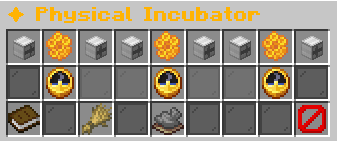
Physical Incubator: three empty upper positions with progress and action controls belowHover an item, focus it with the keyboard, or tap for its in-game tooltip. Bracketed values vary with your game.
▶ Bladewraith Egg▶ Bladewraith Egg▶ Selected for Feed / Claim▶ Selected for Feed / ClaimStage: EggStage: EggExample state · bracketed values depend on your game.Click the HoneycombClick the HoneycombChoose an egg for slot 2.Choose an egg for slot 2.Click the honeycomb between these arrows.Click the honeycomb between these arrows.Insert Egg · Slot 2Insert Egg · Slot 2Click to selectClick to selectClick to choose a pet egg.Click to choose a pet egg.Keep eggs in your inventory.Keep eggs in your inventory.Click the HoneycombClick the HoneycombChoose an egg for slot 2.Choose an egg for slot 2.Click the honeycomb between these arrows.Click the honeycomb between these arrows.Click the HoneycombClick the HoneycombChoose an egg for slot 3.Choose an egg for slot 3.Click the honeycomb between these arrows.Click the honeycomb between these arrows.Insert Egg · Slot 3Insert Egg · Slot 3Click to selectClick to selectClick to choose a pet egg.Click to choose a pet egg.Keep eggs in your inventory.Keep eggs in your inventory.Click the HoneycombClick the HoneycombChoose an egg for slot 3.Choose an egg for slot 3.Click the honeycomb between these arrows.Click the honeycomb between these arrows.EggEgg[▉░░░░░░░░░] [progress]%[▉░░░░░░░░░] [progress]%Time left: [time remaining]Time left: [time remaining]Example state · bracketed values depend on your game.No ProgressNo ProgressInsert a signed egg above.Insert a signed egg above.No ProgressNo ProgressInsert a signed egg above.Insert a signed egg above.Insert an EggInsert an EggClick an empty slot above.Click an empty slot above.Choose an egg from your inventory.Choose an egg from your inventory.Only matching biome families can incubate.Only matching biome families can incubate.FeedFeedSelected slot: 1Selected slot: 1✘ Feeding is only for babies.✘ Feeding is only for babies.Example state · bracketed values depend on your game.ClaimClaimSelected slot: 1Selected slot: 1✘ That pet is still growing.✘ That pet is still growing.Saves this pet to the owner's Pet Delivery.Saves this pet to the owner's Pet Delivery.Claim when growth is complete.Claim when growth is complete.Example state · bracketed values depend on your game.CloseCloseClose the physical incubator.Close the physical incubator.
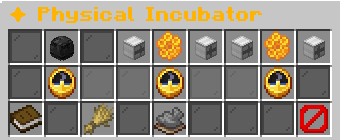
Physical Incubator: a Bladewraith Egg is incubating in the left positionHover an item, focus it with the keyboard, or tap for its in-game tooltip. Bracketed values vary with your game.
▶ Bladewraith Baby▶ Bladewraith Baby▶ Selected for Feed / Claim▶ Selected for Feed / ClaimStage: BabyStage: BabyRarity: UncommonRarity: UncommonFeeds: [feeds]/10Feeds: [feeds]/10Example state · bracketed values depend on your game.Click the HoneycombClick the HoneycombChoose an egg for slot 2.Choose an egg for slot 2.Click the honeycomb between these arrows.Click the honeycomb between these arrows.Insert Egg · Slot 2Insert Egg · Slot 2Click to selectClick to selectClick to choose a pet egg.Click to choose a pet egg.Keep eggs in your inventory.Keep eggs in your inventory.Click the HoneycombClick the HoneycombChoose an egg for slot 2.Choose an egg for slot 2.Click the honeycomb between these arrows.Click the honeycomb between these arrows.Click the HoneycombClick the HoneycombChoose an egg for slot 3.Choose an egg for slot 3.Click the honeycomb between these arrows.Click the honeycomb between these arrows.Insert Egg · Slot 3Insert Egg · Slot 3Click to selectClick to selectClick to choose a pet egg.Click to choose a pet egg.Keep eggs in your inventory.Keep eggs in your inventory.Click the HoneycombClick the HoneycombChoose an egg for slot 3.Choose an egg for slot 3.Click the honeycomb between these arrows.Click the honeycomb between these arrows.BabyBaby[▉░░░░░░░░░] [progress]%[▉░░░░░░░░░] [progress]%Time left: [time remaining]Time left: [time remaining]Example state · bracketed values depend on your game.No ProgressNo ProgressInsert a signed egg above.Insert a signed egg above.No ProgressNo ProgressInsert a signed egg above.Insert a signed egg above.Insert an EggInsert an EggClick an empty slot above.Click an empty slot above.Choose an egg from your inventory.Choose an egg from your inventory.Only matching biome families can incubate.Only matching biome families can incubate.FeedFeedSelected slot: 1Selected slot: 1Feeds: [feeds]/10Feeds: [feeds]/10Ten feeds finish growth immediately.Ten feeds finish growth immediately.Without food, growth takes much longer.Without food, growth takes much longer.Click to choose matching family food.Click to choose matching family food.Example state · bracketed values depend on your game.ClaimClaimSelected slot: 1Selected slot: 1✘ That pet is still growing.✘ That pet is still growing.Saves this pet to the owner's Pet Delivery.Saves this pet to the owner's Pet Delivery.Claim when growth is complete.Claim when growth is complete.Example state · bracketed values depend on your game.CloseCloseClose the physical incubator.Close the physical incubator.
Physical Incubator: a baby is selected for feeding or collectionHover an item, focus it with the keyboard, or tap for its in-game tooltip. Bracketed values vary with your game.
View the related in-game pictures and tooltips (6)
Related pictures and tooltips
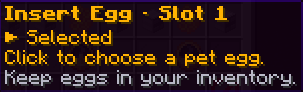
Insert Egg · Slot 1Insert Egg · Slot 1▶ Selected▶ SelectedClick to choose a pet egg.Click to choose a pet egg.Keep eggs in your inventory.Keep eggs in your inventory.
Empty honeycomb position: click to choose a carried pet eggHover an item, focus it with the keyboard, or tap for its in-game tooltip. Bracketed values vary with your game.
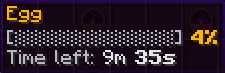
EggEgg[▉░░░░░░░░░] [progress]%[▉░░░░░░░░░] [progress]%Time left: [time remaining]Time left: [time remaining]Example state · bracketed values depend on your game.
Egg progress tooltip: a captured example showing remaining incubation timeHover an item, focus it with the keyboard, or tap for its in-game tooltip. Bracketed values vary with your game.
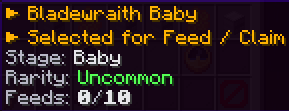
▶ Bladewraith Baby▶ Bladewraith Baby▶ Selected for Feed / Claim▶ Selected for Feed / ClaimStage: BabyStage: BabyRarity: UncommonRarity: UncommonFeeds: [feeds]/10Feeds: [feeds]/10Example state · bracketed values depend on your game.
Bladewraith Baby tooltip showing stage, Uncommon rarity and feed countHover an item, focus it with the keyboard, or tap for its in-game tooltip. Bracketed values vary with your game.
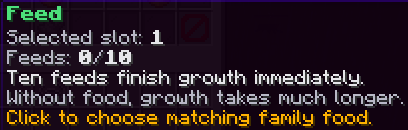
FeedFeedSelected slot: 1Selected slot: 1Feeds: [feeds]/10Feeds: [feeds]/10Ten feeds finish growth immediately.Ten feeds finish growth immediately.Without food, growth takes much longer.Without food, growth takes much longer.Click to choose matching family food.Click to choose matching family food.Example state · bracketed values depend on your game.
Feed control before feeding: select matching family food for the babyHover an item, focus it with the keyboard, or tap for its in-game tooltip. Bracketed values vary with your game.
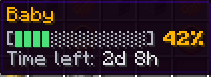
BabyBaby[▉░░░░░░░░░] [progress]%[▉░░░░░░░░░] [progress]%Time left: [time remaining]Time left: [time remaining]Example state · bracketed values depend on your game.
Baby growth progress: a captured example with time remainingHover an item, focus it with the keyboard, or tap for its in-game tooltip. Bracketed values vary with your game.
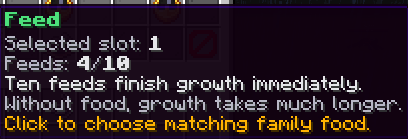
FeedFeedSelected slot: 1Selected slot: 1Feeds: [feeds]/10Feeds: [feeds]/10Ten feeds finish growth immediately.Ten feeds finish growth immediately.Without food, growth takes much longer.Without food, growth takes much longer.Click to choose matching family food.Click to choose matching family food.Example state · bracketed values depend on your game.
Feed control after four feeds in this captured exampleHover an item, focus it with the keyboard, or tap for its in-game tooltip. Bracketed values vary with your game.
Explore the button explanations
Physical Incubator controls
Example with three stacked Incubator blocks and three empty positions. Each position changes from empty to egg, baby and adult.
Choose a pictured button to read what it does. Use arrow keys to move between buttons. On a phone, scroll the picture sideways.
✦ Physical Incubator
Insert Egg · Left — Click an empty position, then choose a family egg carried in your inventory. More positions require stacked Incubator blocks.
All button descriptions (8)
Insert Egg · Left: Click an empty position, then choose a family egg carried in your inventory. More positions require stacked Incubator blocks.
Insert Egg · Middle: Click an empty position, then choose a family egg carried in your inventory. More positions require stacked Incubator blocks.
Insert Egg · Right: Click an empty position, then choose a family egg carried in your inventory. More positions require stacked Incubator blocks.
Progress: Read the timer for the position directly above. An empty position has no progress yet.
Insert an Egg: Help card: click an empty upper position to open the egg picker.
Feed: Use matching family food on the selected baby.
Claim: Send the grown pet to Pet Delivery.
Close: Close this menu.
Top row: Click the Honeycomb: Read Click the Honeycomb. Left egg: Select the left egg or baby. Middle egg: Select the middle egg or baby. Right egg: Select the right egg or baby.
Middle: Left egg progress: Read the left egg’s hatching or growth progress. Middle egg progress: Read the middle egg’s hatching or growth progress. Right egg progress: Read the right egg’s hatching or growth progress.
Bottom row: Insert an Egg: Choose a carried family egg for an empty incubator position. Feed: Use matching family food on the selected baby. Claim sends the grown pet to Pet Delivery. Close: Close this menu.
Click the HoneycombClick the HoneycombChoose an egg for slot 1.Choose an egg for slot 1.Click the honeycomb between these arrows.Click the honeycomb between these arrows.Insert Egg · Slot 1Insert Egg · Slot 1▶ Selected▶ SelectedClick to choose a pet egg.Click to choose a pet egg.Keep eggs in your inventory.Keep eggs in your inventory.Click the HoneycombClick the HoneycombChoose an egg for slot 1.Choose an egg for slot 1.Click the honeycomb between these arrows.Click the honeycomb between these arrows.Click the HoneycombClick the HoneycombChoose an egg for slot 2.Choose an egg for slot 2.Click the honeycomb between these arrows.Click the honeycomb between these arrows.Insert Egg · Slot 2Insert Egg · Slot 2Click to selectClick to selectClick to choose a pet egg.Click to choose a pet egg.Keep eggs in your inventory.Keep eggs in your inventory.Click the HoneycombClick the HoneycombChoose an egg for slot 2.Choose an egg for slot 2.Click the honeycomb between these arrows.Click the honeycomb between these arrows.Click the HoneycombClick the HoneycombChoose an egg for slot 3.Choose an egg for slot 3.Click the honeycomb between these arrows.Click the honeycomb between these arrows.Insert Egg · Slot 3Insert Egg · Slot 3Click to selectClick to selectClick to choose a pet egg.Click to choose a pet egg.Keep eggs in your inventory.Keep eggs in your inventory.Click the HoneycombClick the HoneycombChoose an egg for slot 3.Choose an egg for slot 3.Click the honeycomb between these arrows.Click the honeycomb between these arrows.No ProgressNo ProgressInsert a signed egg above.Insert a signed egg above.No ProgressNo ProgressInsert a signed egg above.Insert a signed egg above.No ProgressNo ProgressInsert a signed egg above.Insert a signed egg above.Insert an EggInsert an EggClick an empty slot above.Click an empty slot above.Choose an egg from your inventory.Choose an egg from your inventory.Only matching biome families can incubate.Only matching biome families can incubate.FeedFeedSelected slot: 1Selected slot: 1✘ No baby in this slot.✘ No baby in this slot.Example state · bracketed values depend on your game.ClaimClaimSelected slot: 1Selected slot: 1✘ Insert an egg first.✘ Insert an egg first.Saves this pet to the owner's Pet Delivery.Saves this pet to the owner's Pet Delivery.Claim when growth is complete.Claim when growth is complete.Example state · bracketed values depend on your game.CloseCloseClose the physical incubator.Close the physical incubator.
Physical Incubator: three empty upper positions with progress and action controls belowHover an item, focus it with the keyboard, or tap for its in-game tooltip. Bracketed values vary with your game.
Insert Egg · Slot 1Insert Egg · Slot 1▶ Selected▶ SelectedClick to choose a pet egg.Click to choose a pet egg.Keep eggs in your inventory.Keep eggs in your inventory.
Empty honeycomb position: click to choose a carried pet eggHover an item, focus it with the keyboard, or tap for its in-game tooltip. Bracketed values vary with your game.
▶ Bladewraith Egg▶ Bladewraith Egg▶ Selected for Feed / Claim▶ Selected for Feed / ClaimStage: EggStage: EggExample state · bracketed values depend on your game.Click the HoneycombClick the HoneycombChoose an egg for slot 2.Choose an egg for slot 2.Click the honeycomb between these arrows.Click the honeycomb between these arrows.Insert Egg · Slot 2Insert Egg · Slot 2Click to selectClick to selectClick to choose a pet egg.Click to choose a pet egg.Keep eggs in your inventory.Keep eggs in your inventory.Click the HoneycombClick the HoneycombChoose an egg for slot 2.Choose an egg for slot 2.Click the honeycomb between these arrows.Click the honeycomb between these arrows.Click the HoneycombClick the HoneycombChoose an egg for slot 3.Choose an egg for slot 3.Click the honeycomb between these arrows.Click the honeycomb between these arrows.Insert Egg · Slot 3Insert Egg · Slot 3Click to selectClick to selectClick to choose a pet egg.Click to choose a pet egg.Keep eggs in your inventory.Keep eggs in your inventory.Click the HoneycombClick the HoneycombChoose an egg for slot 3.Choose an egg for slot 3.Click the honeycomb between these arrows.Click the honeycomb between these arrows.EggEgg[▉░░░░░░░░░] [progress]%[▉░░░░░░░░░] [progress]%Time left: [time remaining]Time left: [time remaining]Example state · bracketed values depend on your game.No ProgressNo ProgressInsert a signed egg above.Insert a signed egg above.No ProgressNo ProgressInsert a signed egg above.Insert a signed egg above.Insert an EggInsert an EggClick an empty slot above.Click an empty slot above.Choose an egg from your inventory.Choose an egg from your inventory.Only matching biome families can incubate.Only matching biome families can incubate.FeedFeedSelected slot: 1Selected slot: 1✘ Feeding is only for babies.✘ Feeding is only for babies.Example state · bracketed values depend on your game.ClaimClaimSelected slot: 1Selected slot: 1✘ That pet is still growing.✘ That pet is still growing.Saves this pet to the owner's Pet Delivery.Saves this pet to the owner's Pet Delivery.Claim when growth is complete.Claim when growth is complete.Example state · bracketed values depend on your game.CloseCloseClose the physical incubator.Close the physical incubator.
Physical Incubator: a Bladewraith Egg is incubating in the left positionHover an item, focus it with the keyboard, or tap for its in-game tooltip. Bracketed values vary with your game.
EggEgg[▉░░░░░░░░░] [progress]%[▉░░░░░░░░░] [progress]%Time left: [time remaining]Time left: [time remaining]Example state · bracketed values depend on your game.
Egg progress tooltip: a captured example showing remaining incubation timeHover an item, focus it with the keyboard, or tap for its in-game tooltip. Bracketed values vary with your game.
▶ Bladewraith Baby▶ Bladewraith Baby▶ Selected for Feed / Claim▶ Selected for Feed / ClaimStage: BabyStage: BabyRarity: UncommonRarity: UncommonFeeds: [feeds]/10Feeds: [feeds]/10Example state · bracketed values depend on your game.Click the HoneycombClick the HoneycombChoose an egg for slot 2.Choose an egg for slot 2.Click the honeycomb between these arrows.Click the honeycomb between these arrows.Insert Egg · Slot 2Insert Egg · Slot 2Click to selectClick to selectClick to choose a pet egg.Click to choose a pet egg.Keep eggs in your inventory.Keep eggs in your inventory.Click the HoneycombClick the HoneycombChoose an egg for slot 2.Choose an egg for slot 2.Click the honeycomb between these arrows.Click the honeycomb between these arrows.Click the HoneycombClick the HoneycombChoose an egg for slot 3.Choose an egg for slot 3.Click the honeycomb between these arrows.Click the honeycomb between these arrows.Insert Egg · Slot 3Insert Egg · Slot 3Click to selectClick to selectClick to choose a pet egg.Click to choose a pet egg.Keep eggs in your inventory.Keep eggs in your inventory.Click the HoneycombClick the HoneycombChoose an egg for slot 3.Choose an egg for slot 3.Click the honeycomb between these arrows.Click the honeycomb between these arrows.BabyBaby[▉░░░░░░░░░] [progress]%[▉░░░░░░░░░] [progress]%Time left: [time remaining]Time left: [time remaining]Example state · bracketed values depend on your game.No ProgressNo ProgressInsert a signed egg above.Insert a signed egg above.No ProgressNo ProgressInsert a signed egg above.Insert a signed egg above.Insert an EggInsert an EggClick an empty slot above.Click an empty slot above.Choose an egg from your inventory.Choose an egg from your inventory.Only matching biome families can incubate.Only matching biome families can incubate.FeedFeedSelected slot: 1Selected slot: 1Feeds: [feeds]/10Feeds: [feeds]/10Ten feeds finish growth immediately.Ten feeds finish growth immediately.Without food, growth takes much longer.Without food, growth takes much longer.Click to choose matching family food.Click to choose matching family food.Example state · bracketed values depend on your game.ClaimClaimSelected slot: 1Selected slot: 1✘ That pet is still growing.✘ That pet is still growing.Saves this pet to the owner's Pet Delivery.Saves this pet to the owner's Pet Delivery.Claim when growth is complete.Claim when growth is complete.Example state · bracketed values depend on your game.CloseCloseClose the physical incubator.Close the physical incubator.
Physical Incubator: a baby is selected for feeding or collectionHover an item, focus it with the keyboard, or tap for its in-game tooltip. Bracketed values vary with your game.
▶ Bladewraith Baby▶ Bladewraith Baby▶ Selected for Feed / Claim▶ Selected for Feed / ClaimStage: BabyStage: BabyRarity: UncommonRarity: UncommonFeeds: [feeds]/10Feeds: [feeds]/10Example state · bracketed values depend on your game.
Bladewraith Baby tooltip showing stage, Uncommon rarity and feed countHover an item, focus it with the keyboard, or tap for its in-game tooltip. Bracketed values vary with your game.
FeedFeedSelected slot: 1Selected slot: 1Feeds: [feeds]/10Feeds: [feeds]/10Ten feeds finish growth immediately.Ten feeds finish growth immediately.Without food, growth takes much longer.Without food, growth takes much longer.Click to choose matching family food.Click to choose matching family food.Example state · bracketed values depend on your game.
Feed control before feeding: select matching family food for the babyHover an item, focus it with the keyboard, or tap for its in-game tooltip. Bracketed values vary with your game.
BabyBaby[▉░░░░░░░░░] [progress]%[▉░░░░░░░░░] [progress]%Time left: [time remaining]Time left: [time remaining]Example state · bracketed values depend on your game.
Baby growth progress: a captured example with time remainingHover an item, focus it with the keyboard, or tap for its in-game tooltip. Bracketed values vary with your game.
FeedFeedSelected slot: 1Selected slot: 1Feeds: [feeds]/10Feeds: [feeds]/10Ten feeds finish growth immediately.Ten feeds finish growth immediately.Without food, growth takes much longer.Without food, growth takes much longer.Click to choose matching family food.Click to choose matching family food.Example state · bracketed values depend on your game.
Feed control after four feeds in this captured exampleHover an item, focus it with the keyboard, or tap for its in-game tooltip. Bracketed values vary with your game.