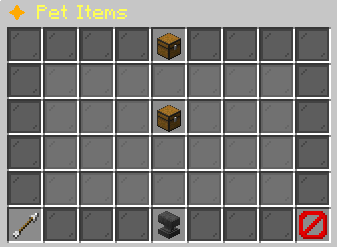
Select a permanent pet item to purchase it. The result goes to Pet Delivery. How To Apply explains attaching the held item to your active floating pet.
What each button does
✦ Pet Items
These are captured in-game menus. Your items, progress and timers can change.
In-game menu pictures
Pet Item ShopPet Item ShopBuy permanent pet items.Buy permanent pet items.After purchase, hold theAfter purchase, hold theitem and right-click anitem and right-click anactive floating pet.active floating pet.No Pet ItemsNo Pet ItemsNo pet item definitionsNo pet item definitionsare configured.are configured.BackBackReturn to the previous menu.Return to the previous menu.How To ApplyHow To Apply1. Buy a pet item.1. Buy a pet item.2. Hold it in main hand.2. Hold it in main hand.3. Right-click your active3. Right-click your active floating pet. floating pet.Permanent once applied.Permanent once applied.CloseCloseClose this menu.Close this menu.
Pet Items: the complete item shop menuHover an item, focus it with the keyboard, or tap for its in-game tooltip. Bracketed values vary with your game.
Explore the button explanations
Menu picture
Illustrated control map. Item availability, labels and locked states can change in-game. Symbols identify actions; they are not exact item textures.
Choose a pictured button to read what it does. Use arrow keys to move between buttons. On a phone, scroll the picture sideways.
✦ Pet Items
Pet Item Shop — Read Pet Item Shop.
All button descriptions (6)
Pet Item Shop: Read Pet Item Shop.
Permanent pet item: Read the attachment and price before buying.
No Pet Items: Read No Pet Items. Other states: Permanent pet item.
Back: Return to the previous menu.
How To Apply: Hold a recognized attachment and use it on your active floating pet.
Close: Close this menu.
Top row: Pet Item Shop: Read Pet Item Shop.
Middle: Permanent pet item: Read the attachment and price before buying. No Pet Items: Read No Pet Items.
Bottom row: Back: Return to the previous menu. How To Apply: Hold a recognized attachment and use it on your active floating pet. Close: Close this menu.
Pet Item ShopPet Item ShopBuy permanent pet items.Buy permanent pet items.After purchase, hold theAfter purchase, hold theitem and right-click anitem and right-click anactive floating pet.active floating pet.No Pet ItemsNo Pet ItemsNo pet item definitionsNo pet item definitionsare configured.are configured.BackBackReturn to the previous menu.Return to the previous menu.How To ApplyHow To Apply1. Buy a pet item.1. Buy a pet item.2. Hold it in main hand.2. Hold it in main hand.3. Right-click your active3. Right-click your active floating pet. floating pet.Permanent once applied.Permanent once applied.CloseCloseClose this menu.Close this menu.
Pet Items: the complete item shop menuHover an item, focus it with the keyboard, or tap for its in-game tooltip. Bracketed values vary with your game.